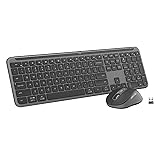
Adding a wireless keyboard and mouse to my classroom was a game changer this year. I went deskless a couple of years ago, so I sit in a circle with my students during many activities. I have a regular desk at the front of the room but the HDMI cable doesn’t reach to where I sit in our circle and the wireless connection from my laptop to my projector is a bit too laggy for some higher resolution streaming. I keep this keyboard on a stool right in front of me and the mouse on a table to my right where I keep my laser pointer and planner.
This keyboard has more features than I will ever use in the classroom. There are all the features you would find on an integrated laptop keyboard and then some. I can launch Windows Media Player, various Microsoft Office apps, and a calculator all right from my keyboard. I specially like the separate volume and media control buttons that are conveniently located at the very top. No more pressing “F2” and “F3” to control the volume.
I strongly recommend this one if you prefer a quiet, slim keyboard with customizable keys, buttons, and shortcuts to streamline your specific classroom tasks.
I like a moderate amount of tactile feedback from the keys, but without the noise—this keyboard checks both boxes. Logitech advertises “whisper-quiet” typing with this unit. While it’s not quite silent, it is the quietest keyboard I have ever used. I like it because you can still hear the keys but it’s not distracting to anyone in the room unlike the cheap cabled keyboards that come with desktops.
I appreciate that Logitech made this a higher end rectangular keyboard. I’m not a fan of the “wave” style keyboard, as it doesn’t feel as natural to type with my hands in that position.
One of my favorite features of this Logitech MK955 keyboard and mouse combo is the unifying USB receiver. This simply means that the same USB receiver handles both the mouse and the keyboard. The receiver is so compact (about half an inch long when plugged in) that I can just put my laptop into my bag without removing the USB receiver. It has never gotten in the way or been dislodged. I keep the USB receiver on the side of my laptop that is facing our class circle and haven’t had a single issue with connectivity after more than two months of extensive daily usage. This is one of the most common issues with cheaper units. Logitech’s specs tout a 10-meter range. I keep mine at around six meters away with a few students sitting in between the keyboard/mouse and the USB receiver without any issues.
The ambidextrous full-size mouse is just the right size. As is the case with the keyboard, this mouse is so quiet when you click it. The scroll button is conveniently located and operates very smoothly. I keep my mouse directly on the table (no mousepad). It tracks smoothly in all applications. You should be OK using it on any clean, semi-smooth surface except for glass.
The battery life has been outstanding so far. The keyboard uses two AAA batteries and the mouse uses one. I have been using Logitech peripherals for the past couple of decades and have always experienced long battery life from all of them. You should get at least a year or two from each of these devices using a quality Duracell or Energizer battery.
Consider going wireless for your next keyboard to take advantage of the flexibility it affords you to move around the classroom. I can confidently say that this keyboard has improved my classroom management and engagement by keeping me in the circle—we’re all familiar with how quickly a class can lose its focus during even the briefest transitions.